Bulk Edit Submittals and RFIs for Procore
Update custom fields, ball-in-court, dates, and more across hundreds of items at once. Changes sync back to Procore automatically.
Bulk editing at scale for Procore
Sandspit makes it easy to apply changes to custom fields, ball-in-court, dates, and more across large sets of submittals and RFIs — with everything synced back to Procore automatically.
Custom Field Support
Edit any custom field you've configured in Procore. Text, dropdowns, dates, checkboxes: all fully supported for bulk editing.
Automatic Sync
Changes sync back to Procore automatically. No exports, no imports, no manual data entry.
Select and Apply
Select items using checkboxes or shift-click, make your edits, and apply. It's that simple.
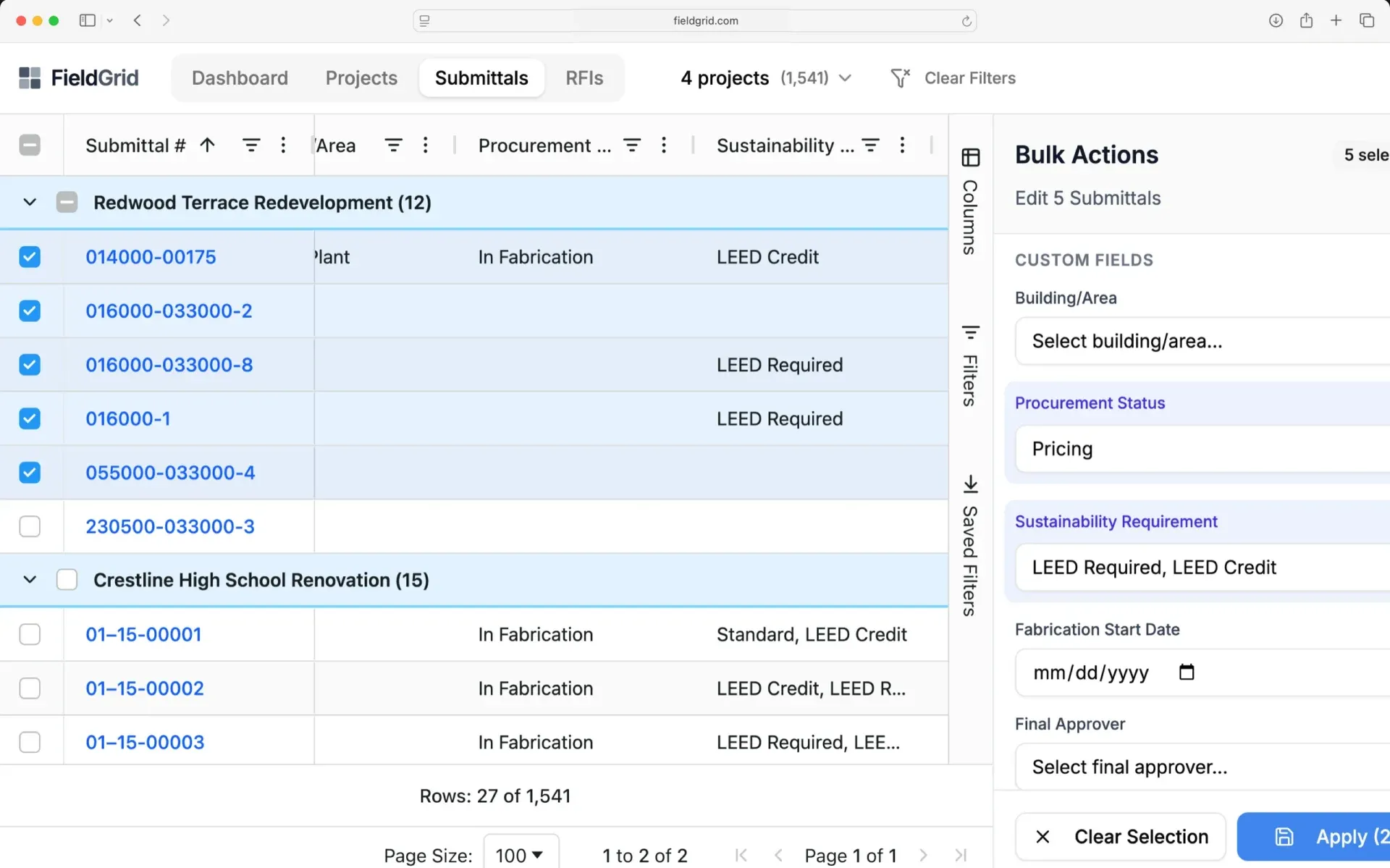
Common bulk editing tasks made easy
Tasks that used to take hours of clicking through individual records now take seconds.
Update ball-in-court. Reassign hundreds of items to a different responsible party in one action.
Set custom field values. Populate tracking fields, priority levels, or any custom data across multiple items.
Adjust dates en masse. Shift required dates, due dates, or any date field across your selection.
Change status. Move multiple items through your workflow stages simultaneously.
Ready to transform your workflow?
Join construction teams who use Sandspit to eliminate duplicate entry and keep their Procore data perfectly in sync.