Build the Procore budget without leaving Excel.
Start with the estimate or buyout workbook you already have. Sandspit validates every row against the live Procore project, then syncs new and changed lines without the template-download and re-keying loop.
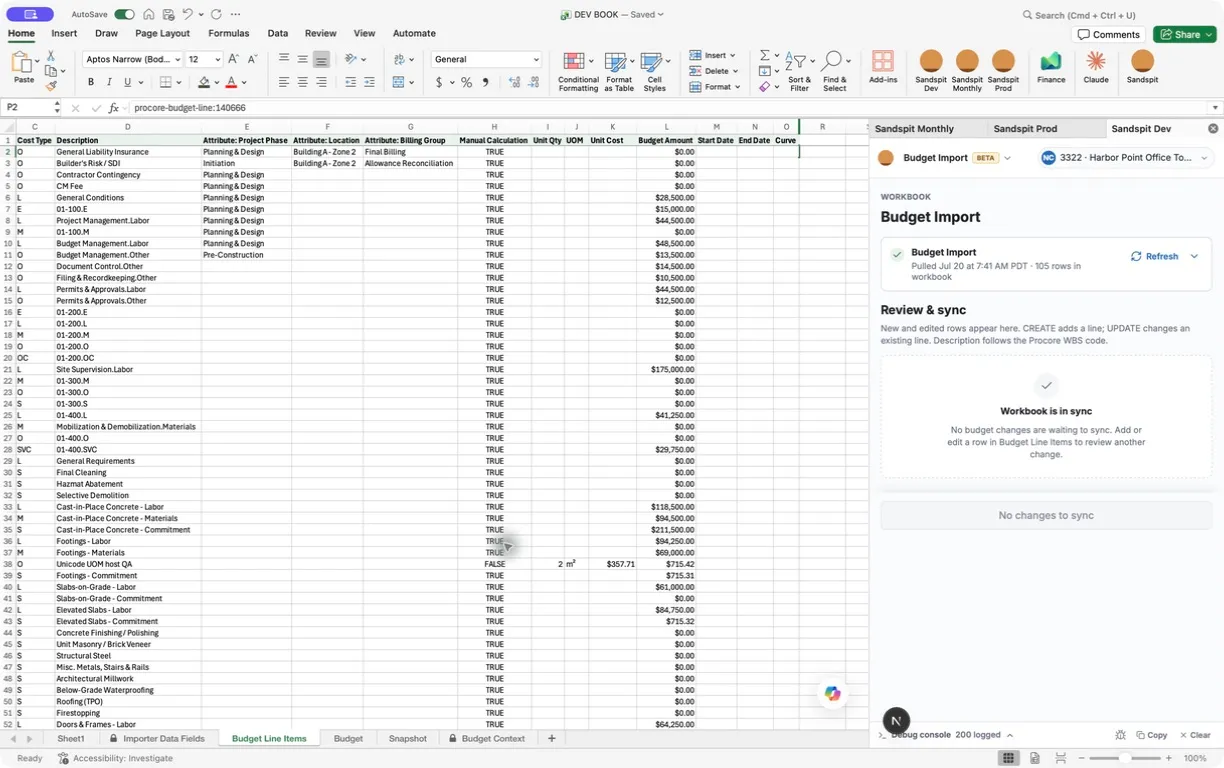
From the estimate to the Procore budget.
This video pastes an estimate into the budget sheet, adds the cost codes the project is missing, and creates every budget line in Procore. Errors are flagged inline and fixed before you sync.
The original budget becomes a spreadsheet job again.
Budget Import connects the sheet your team already works in to Procore. Paste, validate, and sync the original budget from one workbook.
- 01
Paste
Put the budget into a Procore-compatible worksheet without re-keying it into a downloaded template.
- 02
Validate
Check every row against live cost codes, cost types, budget codes, attributes, and calculation rules.
- 03
Sync
Review creates and updates, then write only ready lines to the original budget in Procore.
Reshape the data. Do not reinvent it.
Source workbooks often have merged headers, subtotal rows, and columns that do not match Procore. Map them into Budget Line Items yourself or with an AI assistant. The model reshapes the data; Sandspit validates every row against the live project configuration before it can sync.
Workbook mapping
Source workbook → Budget Line Items
Errors land on the row before the upload.
Sandspit checks every non-blank row against the selected project's live setup. Click an issue to jump to the offending Excel cell.
- Invalid cost-code and cost-type assignments
- Duplicate sub job, cost code, and cost type combinations
- Budget codes that already have an original budget line
- Quantity and unit-cost calculations that do not match the amount
Review & sync
Budget Line Items
03-300 · S
New line · Cast-in-Place Concrete · $211,500.00
01-100 · L
Budget amount changed · $28,500.00 → $31,000.00
09-290 · S
Company cost code is approved but missing from the project WBS.
Missing project cost codes do not require an admin-tool detour.
Add approved company cost codes to the project WBS, including parent codes, then revalidate.
The budget stays a spreadsheet.
Pull the current unlocked budget, paste revisions, and fill amounts in Excel. Sandspit preserves the connection to Procore.
Create and update in one queue
New rows queue as CREATE. Changed lines keep their Procore line IDs and queue as UPDATE. Unchanged lines stay out of the queue.
Attributes live in the same columns
Project-level budget-code attributes come down as worksheet columns with dropdowns fed by the live picklists. Fill an attribute down across fifty lines, then sync the values back to the WBS code in Procore.
Budget Import questions
Want to see how it fits your WBS and original-budget process? Talk to us.
Does Budget Import replace Procore?
No. Procore remains the system of record. Sandspit is the connected Excel workspace where the budget is shaped, checked, and prepared before it syncs.
Can it update a budget after the initial import?
Yes. Existing lines keep their Procore line IDs behind the scenes. Edits queue as updates, new rows queue as creates, and unchanged lines stay out of the sync queue.
Can an AI assistant create budget data in Procore?
An AI assistant can help reshape a source workbook into the target columns. Sandspit then applies deterministic validation against the live project configuration before any row can sync.
See it on your project
Build your next Procore budget in Excel.
Bring an estimate or buyout tracker. We'll map, validate, and sync it against your Procore setup.